Dental Office Reception Desk: A Complete Guide to Design and Function
The reception desk is the command center of your dental practice. It is the first thing patients see when they walk through your door. It is where appointments are scheduled, payments are processed, and questions are answered. It is where your team spends hours every day managing the flow of your practice.
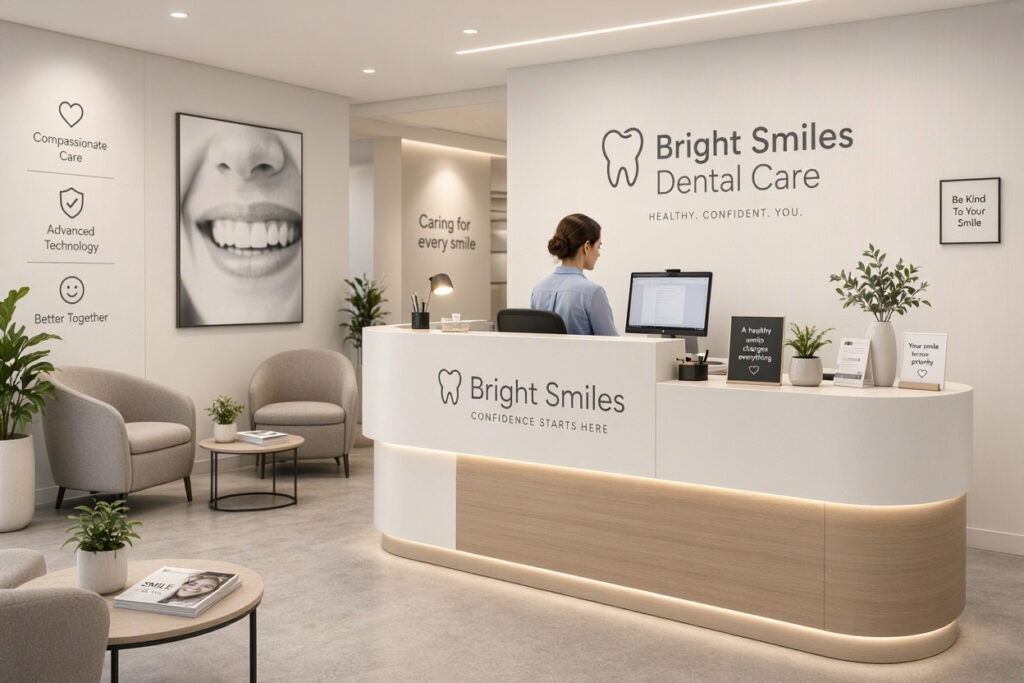
But the reception desk is more than a functional workspace. It is a design statement. It communicates your brand, sets the tone for patient experience, and shapes the efficiency of your front office operations. A poorly designed desk creates bottlenecks, discomfort, and a bad first impression. A well-designed desk does the opposite. It welcomes patients, supports your team, and makes everything run smoothly.
This guide covers everything you need to know about the dental office reception desk. You will learn about design principles, materials, ergonomics, technology integration, and practical tips. By the end, you will have a clear plan to design a reception desk that works beautifully for both patients and staff.
But the reception desk is more than a functional workspace. It is a design statement. It communicates your brand, sets the tone for patient experience, and shapes the efficiency of your front office operations. A poorly designed desk creates bottlenecks, discomfort, and a bad first impression. A well-designed desk does the opposite. It welcomes patients, supports your team, and makes everything run smoothly.
This guide covers everything you need to know about the dental office reception desk. You will learn about design principles, materials, ergonomics, technology integration, and practical tips. By the end, you will have a clear plan to design a reception desk that works beautifully for both patients and staff.
Why the Reception Desk Matters
The reception desk is the face of your practice. It deserves careful thought. Here is why it matters.
It Creates the First Impression: Patients form an opinion within seconds. A clean, organized, welcoming desk builds trust immediately.
It Sets the Tone: A calm, professional desk reduces patient anxiety. A chaotic one increases stress.
It Drives Efficiency: A well-designed desk streamlines check-in, scheduling, and payment. This saves time for patients and staff.
It Supports Your Team: Front office staff spend hours at the desk. Ergonomic design and good organization reduce fatigue and improve morale.
It Reinforces Your Brand: The design, colors, and materials of your desk communicate your practice identity.
It Impacts Revenue: An efficient desk reduces no-shows, collects payments promptly, and maximizes schedule utilization.
“The reception desk is the cockpit of your practice. If it is disorganized, the whole practice feels disorganized. If it runs smoothly, everything else follows.” — Dr. Susan Blake, Dental Practice Consultant
Design Principles for Dental Reception Desks
A great reception desk balances form and function. Here are the key principles.
1. Visibility and Accessibility
The desk should be visible immediately upon entering. Patients should be able to see staff and staff should be able to see patients. The counter height should accommodate both standing and seated patients. Ensure wheelchair accessibility with a lower section of the counter.
2. Ergonomic Design
Your front office staff spend hours at the desk. The design should support their health and comfort. Consider adjustable desk heights, ergonomic chairs, and proper monitor placement. Ensure adequate legroom and storage.
3. Organization and Storage
A cluttered desk looks unprofessional and slows down workflow. Design ample storage for files, supplies, and personal items. Use closed cabinets to hide clutter. Keep frequently used items within easy reach.
4. Privacy
Patient conversations at the desk should be private. Use partitions, background noise, or a separate consultation area for sensitive discussions. Avoid discussing patient information within earshot of the waiting room.
5. Durability
The reception desk is a high-traffic area. Choose materials that are durable and easy to clean. Avoid materials that scratch, stain, or wear easily.
6. Technology Integration
The modern reception desk is a technology hub. Design space for computers, monitors, phones, printers, and payment terminals. Ensure cables are managed and out of sight. Plan for future technology upgrades.
7. Branding
Your reception desk should reflect your brand. Use your brand colors, logo, and design elements. This creates a cohesive, recognizable look.
Principle Goal Key Design Elements
Visibility Easy patient-staff interaction Clear sightlines, accessible height
Ergonomics Staff comfort and health Adjustable desks, ergonomic chairs
Organization Efficient workflow Ample storage, closed cabinets
Privacy Confidentiality Partitions, separate consultation area
Durability Long-lasting appearance Quality materials, easy-clean surfaces
Technology Efficient operations Cable management, space for devices
Branding Brand recognition Brand colors, logo, design elements
Note for Readers: Always consult with an interior designer or contractor who has experience with dental offices. They can help you optimize your desk design for both aesthetics and function.
Types of Reception Desk Layouts
There are several common reception desk layouts. Each has its own strengths and weaknesses.
1. The Straight Desk
A linear desk positioned against a wall or in a straight line. This is simple, space-efficient, and easy to navigate.
Pros: Space-efficient, affordable, simple
Cons: Can feel impersonal, limited storage
Best For: Small practices, compact spaces
2. The L-Shaped Desk
An L-shaped desk that wraps around a corner. This provides more workspace and storage.
Pros: More workspace, good storage, defined area
Cons: Requires more space, can block sightlines
Best For: Medium practices, corner spaces
3. The U-Shaped Desk
A U-shaped desk that wraps around three sides. This provides maximum workspace and storage.
Pros: Maximum workspace, excellent storage, good privacy
Cons: Requires significant space, can feel enclosed
Best For: Large practices, dedicated front office
4. The Curved Desk
A curved desk that creates a welcoming, organic shape. This is modern and patient-friendly.
Pros: Welcoming, modern, good sightlines
Cons: Custom design, higher cost
Best For: Practices that want a unique, branded look
5. The Standing-Height Desk
A desk designed for standing or perching. This promotes movement and reduces sitting fatigue.
Pros: Ergonomic, modern, promotes movement
Cons: Not suitable for all tasks, may tire staff
Best For: Practices that value staff wellness
Layout Type Best For Pros Cons
Straight Small practices Space-efficient, affordable Impersonal, limited storage
L-Shaped Medium practices More workspace, good storage Requires more space
U-Shaped Large practices Maximum workspace, privacy Requires significant space
Curved Branded practices Welcoming, modern Custom, higher cost
Standing Wellness-focused Ergonomic, modern May tire staff
Pro Tip: Choose a layout that fits your space and workflow. Visit other dental offices to see different layouts in action. Ask colleagues about what works and what they would change.
Materials and Finishes
The materials you choose affect the look, durability, and maintenance of your reception desk. Here is a comparison.
1. Laminate
Pros: Affordable, available in many colors and patterns, easy to clean
Cons: Can chip or peel, less premium look
Best For: Budget-conscious practices
2. Solid Surface (Corian, Quartz)
Pros: Durable, seamless, easy to clean, premium look
Cons: Higher cost, can scratch
Best For: Mid to high-end practices
3. Wood Veneer
Pros: Warm, natural, premium look
Cons: Requires maintenance, can scratch and stain
Best For: Practices that want a warm, natural aesthetic
4. Glass
Pros: Modern, sleek, easy to clean
Cons: Shows fingerprints, can break, less privacy
Best For: Modern practices, accent areas
5. Metal
Pros: Durable, modern, easy to clean
Cons: Can feel cold, may dent
Best For: Industrial or modern aesthetics
6. Stone (Granite, Marble)
Pros: Luxurious, durable, unique
Cons: Expensive, heavy, requires sealing
Best For: High-end practices
Material Durability Cost Best For
Laminate Medium Low Budget-conscious
Solid Surface High Medium-High Mid to high-end
Wood Veneer Medium Medium Warm aesthetic
Glass Medium Medium Modern look
Metal High Medium Industrial look
Stone Very High High Luxury practices
Note for Readers: Choose materials that are easy to clean and disinfect. The reception desk is a high-touch area. Avoid porous materials that trap bacteria.
Ergonomics for Front Office Staff
Your front office team spends hours at the reception desk. Ergonomic design protects their health and improves productivity.
1. Seating
Invest in high-quality, adjustable ergonomic chairs. The chair should support the lower back, have adjustable height, and allow feet to rest flat on the floor.
2. Desk Height
The desk height should allow staff to work with their elbows at a 90-degree angle. Adjustable desks allow staff to switch between sitting and standing.
3. Monitor Placement
Monitors should be at eye level, about an arm’s length away. Use monitor arms to adjust height and angle. Avoid glare from windows and overhead lights.
4. Keyboard and Mouse
Use ergonomic keyboards and mice. Keep wrists in a neutral position. Consider a keyboard tray for adjustable positioning.
5. Footrest
A footrest reduces strain on the lower back and legs. Choose an adjustable footrest that suits each staff member.
6. Lighting
Good task lighting reduces eye strain. Use adjustable desk lamps and ensure overhead lighting is not too harsh.
Ergonomic Factor Recommendation Benefit
Seating Adjustable ergonomic chair Back support, comfort
Desk Height Adjustable or 90-degree elbow Reduces strain
Monitor Eye level, arm’s length Reduces neck strain
Keyboard/Mouse Ergonomic, neutral wrists Reduces wrist strain
Footrest Adjustable Reduces lower back strain
Lighting Adjustable task lighting Reduces eye strain
Pro Tip: Encourage staff to take regular breaks and stretch. Even the best ergonomic setup cannot compensate for hours of continuous sitting.
Technology Integration
The modern reception desk is a technology hub. Here is how to integrate technology seamlessly.
1. Computer and Monitor Placement
Position computers and monitors for easy viewing and typing. Use monitor arms and cable management to keep the desk clean.
2. Cable Management
Hide cables with cable trays, grommets, and covers. A cluttered desk with tangled wires looks unprofessional.
3. Payment Terminals
Place payment terminals where patients can easily reach them. Ensure they are secure and connected.
4. Phone System
Use a multi-line phone system with headsets for staff comfort. Ensure phones are within easy reach.
5. Printer and Scanner
Place printers and scanners in a convenient location, ideally within arm’s reach or a few steps away. Ensure they are connected and maintained.
6. Digital Displays
Consider a small digital display for patient information, announcements, or queue numbers. This improves communication and reduces staff workload.
Technology Placement Key Consideration
Computer Central, adjustable Ergonomic viewing
Cables Hidden, managed Clean appearance
Payment Terminal Patient-accessible Secure, connected
Phone Within reach Headset compatible
Printer/Scanner Nearby Easy access
Digital Display Visible to patients Clear, informative
Important Note: Ensure all technology complies with HIPAA and data protection regulations. Protect patient information with secure systems and regular backups.
Branding Your Reception Desk
Your reception desk is a branding opportunity. Here is how to make the most of it.
1. Use Your Brand Colors
Paint or finish your desk in your brand colors. This creates a cohesive, recognizable look.
2. Add Your Logo
Place your logo prominently on the front of the desk or on a sign above it. Ensure it is well-lit and visible.
3. Include Your Tagline
Add your practice tagline to the desk or a nearby sign. This reinforces your brand message.
4. Display Credentials
Showcase your team’s credentials and awards in a neat, organized display. This builds trust and credibility.
5. Keep It Clean
A cluttered desk undermines your brand. Keep the surface clean and organized. Use closed storage to hide clutter.
“Your reception desk is a billboard inside your office. It should say something about who you are and what you value. Make it count.” — David Park, Brand Strategist
Common Reception Desk Design Mistakes to Avoid
Even well-intentioned designs can go wrong. Here are the most common mistakes.
Too Small: A cramped desk makes work difficult and looks unprofessional. Fix it by planning for adequate space.
Too High or Too Low: A desk that is the wrong height causes discomfort for staff and patients. Fix it with adjustable or dual-height counters.
Poor Storage: Lack of storage leads to clutter. Fix it with ample closed cabinets and drawers.
Ignoring Ergonomics: Poor seating and desk height lead to pain and fatigue. Fix it with ergonomic furniture.
No Privacy: Patient conversations are overheard. Fix it with partitions or a separate consultation area.
Cable Clutter: Tangled wires look messy. Fix it with cable management solutions.
Neglecting Branding: A generic desk misses a branding opportunity. Fix it with your colors, logo, and design elements.
“The most common mistake I see is underestimating storage. A reception desk needs more storage than you think. Plan for it from the start.” — Sarah Mitchell, Healthcare Interior Designer
Budgeting for a Reception Desk
Reception desks range widely in cost. Here is a simple budgeting framework.
Desk Type Cost Range Notes
Laminate Straight Desk $1,000 – $3,000 Affordable, simple
L-Shaped Desk $2,000 – $5,000 More workspace
U-Shaped Desk $3,000 – $8,000 Maximum workspace
Custom Curved Desk $5,000 – $15,000+ Unique, branded
Solid Surface $3,000 – $10,000 Durable, premium
Stone $5,000 – $20,000+ Luxury, unique
Pro Tip: Invest in quality materials and ergonomic design. The reception desk is used every day. A cheap desk will need replacing sooner and may cause staff discomfort.
Frequently Asked Questions
What is the ideal height for a dental reception desk?
A standard desk height is 29-30 inches for seated work. A patient counter height is typically 42-48 inches for standing transactions. Consider a dual-height design with a lower section for wheelchair accessibility.
What materials are best for a dental reception desk?
Solid surface materials like quartz or Corian are durable, easy to clean, and look premium. Laminate is a budget-friendly option. Avoid porous materials that trap bacteria.
How can I make my reception desk more ergonomic?
Invest in adjustable chairs, monitor arms, ergonomic keyboards, and footrests. Ensure the desk height allows a 90-degree elbow angle. Encourage staff to take breaks and stretch.
How do I keep my reception desk organized?
Use closed cabinets and drawers to hide clutter. Keep frequently used items within reach. Implement a daily cleaning routine. Use cable management to hide wires.
Should I include a privacy partition at my reception desk?
Yes, if patient conversations are a concern. Partitions, background noise, or a separate consultation area protect confidentiality and improve patient experience.
How do I brand my reception desk?
Use your brand colors for the desk finish. Add your logo prominently. Include your tagline. Display credentials neatly. Keep the desk clean and organized to reflect your professionalism.
Conclusion
The dental office reception desk is the heart of your practice operations and the face of your brand. By focusing on thoughtful design, ergonomic function, and effective branding, you can create a reception desk that welcomes patients and supports your team.
Additional Resource
For more guidance on dental office design and front office operations, explore the American Dental Association’s practice management resources. https://www.ada.org/resources/practice/practice-management
Why the Reception Desk Matters
The reception desk is the face of your practice. It deserves careful thought. Here is why it matters.
- It Creates the First Impression: Patients form an opinion within seconds. A clean, organized, welcoming desk builds trust immediately.
- It Sets the Tone: A calm, professional desk reduces patient anxiety. A chaotic one increases stress.
- It Drives Efficiency: A well-designed desk streamlines check-in, scheduling, and payment. This saves time for patients and staff.
- It Supports Your Team: Front office staff spend hours at the desk. Ergonomic design and good organization reduce fatigue and improve morale.
- It Reinforces Your Brand: The design, colors, and materials of your desk communicate your practice identity.
- It Impacts Revenue: An efficient desk reduces no-shows, collects payments promptly, and maximizes schedule utilization.
“The reception desk is the cockpit of your practice. If it is disorganized, the whole practice feels disorganized. If it runs smoothly, everything else follows.” — Dr. Susan Blake, Dental Practice Consultant
Design Principles for Dental Reception Desks
A great reception desk balances form and function. Here are the key principles.
1. Visibility and Accessibility
The desk should be visible immediately upon entering. Patients should be able to see staff and staff should be able to see patients. The counter height should accommodate both standing and seated patients. Ensure wheelchair accessibility with a lower section of the counter.
2. Ergonomic Design
Your front office staff spend hours at the desk. The design should support their health and comfort. Consider adjustable desk heights, ergonomic chairs, and proper monitor placement. Ensure adequate legroom and storage.
3. Organization and Storage
A cluttered desk looks unprofessional and slows down workflow. Design ample storage for files, supplies, and personal items. Use closed cabinets to hide clutter. Keep frequently used items within easy reach.
4. Privacy
Patient conversations at the desk should be private. Use partitions, background noise, or a separate consultation area for sensitive discussions. Avoid discussing patient information within earshot of the waiting room.
5. Durability
The reception desk is a high-traffic area. Choose materials that are durable and easy to clean. Avoid materials that scratch, stain, or wear easily.
6. Technology Integration
The modern reception desk is a technology hub. Design space for computers, monitors, phones, printers, and payment terminals. Ensure cables are managed and out of sight. Plan for future technology upgrades.
7. Branding
Your reception desk should reflect your brand. Use your brand colors, logo, and design elements. This creates a cohesive, recognizable look.
| Principle | Goal | Key Design Elements |
|---|---|---|
| Visibility | Easy patient-staff interaction | Clear sightlines, accessible height |
| Ergonomics | Staff comfort and health | Adjustable desks, ergonomic chairs |
| Organization | Efficient workflow | Ample storage, closed cabinets |
| Privacy | Confidentiality | Partitions, separate consultation area |
| Durability | Long-lasting appearance | Quality materials, easy-clean surfaces |
| Technology | Efficient operations | Cable management, space for devices |
| Branding | Brand recognition | Brand colors, logo, design elements |
Note for Readers: Always consult with an interior designer or contractor who has experience with dental offices. They can help you optimize your desk design for both aesthetics and function.
Types of Reception Desk Layouts
There are several common reception desk layouts. Each has its own strengths and weaknesses.
1. The Straight Desk
A linear desk positioned against a wall or in a straight line. This is simple, space-efficient, and easy to navigate.
- Pros: Space-efficient, affordable, simple
- Cons: Can feel impersonal, limited storage
- Best For: Small practices, compact spaces
2. The L-Shaped Desk
An L-shaped desk that wraps around a corner. This provides more workspace and storage.
- Pros: More workspace, good storage, defined area
- Cons: Requires more space, can block sightlines
- Best For: Medium practices, corner spaces
3. The U-Shaped Desk
A U-shaped desk that wraps around three sides. This provides maximum workspace and storage.
- Pros: Maximum workspace, excellent storage, good privacy
- Cons: Requires significant space, can feel enclosed
- Best For: Large practices, dedicated front office
4. The Curved Desk
A curved desk that creates a welcoming, organic shape. This is modern and patient-friendly.
- Pros: Welcoming, modern, good sightlines
- Cons: Custom design, higher cost
- Best For: Practices that want a unique, branded look
5. The Standing-Height Desk
A desk designed for standing or perching. This promotes movement and reduces sitting fatigue.
- Pros: Ergonomic, modern, promotes movement
- Cons: Not suitable for all tasks, may tire staff
- Best For: Practices that value staff wellness
| Layout Type | Best For | Pros | Cons |
|---|---|---|---|
| Straight | Small practices | Space-efficient, affordable | Impersonal, limited storage |
| L-Shaped | Medium practices | More workspace, good storage | Requires more space |
| U-Shaped | Large practices | Maximum workspace, privacy | Requires significant space |
| Curved | Branded practices | Welcoming, modern | Custom, higher cost |
| Standing | Wellness-focused | Ergonomic, modern | May tire staff |
Pro Tip: Choose a layout that fits your space and workflow. Visit other dental offices to see different layouts in action. Ask colleagues about what works and what they would change.
Materials and Finishes
The materials you choose affect the look, durability, and maintenance of your reception desk. Here is a comparison.
1. Laminate
- Pros: Affordable, available in many colors and patterns, easy to clean
- Cons: Can chip or peel, less premium look
- Best For: Budget-conscious practices
2. Solid Surface (Corian, Quartz)
- Pros: Durable, seamless, easy to clean, premium look
- Cons: Higher cost, can scratch
- Best For: Mid to high-end practices
3. Wood Veneer
- Pros: Warm, natural, premium look
- Cons: Requires maintenance, can scratch and stain
- Best For: Practices that want a warm, natural aesthetic
4. Glass
- Pros: Modern, sleek, easy to clean
- Cons: Shows fingerprints, can break, less privacy
- Best For: Modern practices, accent areas
5. Metal
- Pros: Durable, modern, easy to clean
- Cons: Can feel cold, may dent
- Best For: Industrial or modern aesthetics
6. Stone (Granite, Marble)
- Pros: Luxurious, durable, unique
- Cons: Expensive, heavy, requires sealing
- Best For: High-end practices
| Material | Durability | Cost | Best For |
|---|---|---|---|
| Laminate | Medium | Low | Budget-conscious |
| Solid Surface | High | Medium-High | Mid to high-end |
| Wood Veneer | Medium | Medium | Warm aesthetic |
| Glass | Medium | Medium | Modern look |
| Metal | High | Medium | Industrial look |
| Stone | Very High | High | Luxury practices |
Note for Readers: Choose materials that are easy to clean and disinfect. The reception desk is a high-touch area. Avoid porous materials that trap bacteria.
Ergonomics for Front Office Staff
Your front office team spends hours at the reception desk. Ergonomic design protects their health and improves productivity.
1. Seating
Invest in high-quality, adjustable ergonomic chairs. The chair should support the lower back, have adjustable height, and allow feet to rest flat on the floor.
2. Desk Height
The desk height should allow staff to work with their elbows at a 90-degree angle. Adjustable desks allow staff to switch between sitting and standing.
3. Monitor Placement
Monitors should be at eye level, about an arm’s length away. Use monitor arms to adjust height and angle. Avoid glare from windows and overhead lights.
4. Keyboard and Mouse
Use ergonomic keyboards and mice. Keep wrists in a neutral position. Consider a keyboard tray for adjustable positioning.
5. Footrest
A footrest reduces strain on the lower back and legs. Choose an adjustable footrest that suits each staff member.
6. Lighting
Good task lighting reduces eye strain. Use adjustable desk lamps and ensure overhead lighting is not too harsh.
| Ergonomic Factor | Recommendation | Benefit |
|---|---|---|
| Seating | Adjustable ergonomic chair | Back support, comfort |
| Desk Height | Adjustable or 90-degree elbow | Reduces strain |
| Monitor | Eye level, arm’s length | Reduces neck strain |
| Keyboard/Mouse | Ergonomic, neutral wrists | Reduces wrist strain |
| Footrest | Adjustable | Reduces lower back strain |
| Lighting | Adjustable task lighting | Reduces eye strain |
Pro Tip: Encourage staff to take regular breaks and stretch. Even the best ergonomic setup cannot compensate for hours of continuous sitting.
Technology Integration
The modern reception desk is a technology hub. Here is how to integrate technology seamlessly.
1. Computer and Monitor Placement
Position computers and monitors for easy viewing and typing. Use monitor arms and cable management to keep the desk clean.
2. Cable Management
Hide cables with cable trays, grommets, and covers. A cluttered desk with tangled wires looks unprofessional.
3. Payment Terminals
Place payment terminals where patients can easily reach them. Ensure they are secure and connected.
4. Phone System
Use a multi-line phone system with headsets for staff comfort. Ensure phones are within easy reach.
5. Printer and Scanner
Place printers and scanners in a convenient location, ideally within arm’s reach or a few steps away. Ensure they are connected and maintained.
6. Digital Displays
Consider a small digital display for patient information, announcements, or queue numbers. This improves communication and reduces staff workload.
| Technology | Placement | Key Consideration |
|---|---|---|
| Computer | Central, adjustable | Ergonomic viewing |
| Cables | Hidden, managed | Clean appearance |
| Payment Terminal | Patient-accessible | Secure, connected |
| Phone | Within reach | Headset compatible |
| Printer/Scanner | Nearby | Easy access |
| Digital Display | Visible to patients | Clear, informative |
Important Note: Ensure all technology complies with HIPAA and data protection regulations. Protect patient information with secure systems and regular backups.
Branding Your Reception Desk
Your reception desk is a branding opportunity. Here is how to make the most of it.
1. Use Your Brand Colors
Paint or finish your desk in your brand colors. This creates a cohesive, recognizable look.
2. Add Your Logo
Place your logo prominently on the front of the desk or on a sign above it. Ensure it is well-lit and visible.
3. Include Your Tagline
Add your practice tagline to the desk or a nearby sign. This reinforces your brand message.
4. Display Credentials
Showcase your team’s credentials and awards in a neat, organized display. This builds trust and credibility.
5. Keep It Clean
A cluttered desk undermines your brand. Keep the surface clean and organized. Use closed storage to hide clutter.
“Your reception desk is a billboard inside your office. It should say something about who you are and what you value. Make it count.” — David Park, Brand Strategist
Common Reception Desk Design Mistakes to Avoid
Even well-intentioned designs can go wrong. Here are the most common mistakes.
- Too Small: A cramped desk makes work difficult and looks unprofessional. Fix it by planning for adequate space.
- Too High or Too Low: A desk that is the wrong height causes discomfort for staff and patients. Fix it with adjustable or dual-height counters.
- Poor Storage: Lack of storage leads to clutter. Fix it with ample closed cabinets and drawers.
- Ignoring Ergonomics: Poor seating and desk height lead to pain and fatigue. Fix it with ergonomic furniture.
- No Privacy: Patient conversations are overheard. Fix it with partitions or a separate consultation area.
- Cable Clutter: Tangled wires look messy. Fix it with cable management solutions.
- Neglecting Branding: A generic desk misses a branding opportunity. Fix it with your colors, logo, and design elements.
“The most common mistake I see is underestimating storage. A reception desk needs more storage than you think. Plan for it from the start.” — Sarah Mitchell, Healthcare Interior Designer
Budgeting for a Reception Desk
Reception desks range widely in cost. Here is a simple budgeting framework.
| Desk Type | Cost Range | Notes |
|---|---|---|
| Laminate Straight Desk | $1,000 – $3,000 | Affordable, simple |
| L-Shaped Desk | $2,000 – $5,000 | More workspace |
| U-Shaped Desk | $3,000 – $8,000 | Maximum workspace |
| Custom Curved Desk | $5,000 – $15,000+ | Unique, branded |
| Solid Surface | $3,000 – $10,000 | Durable, premium |
| Stone | $5,000 – $20,000+ | Luxury, unique |
Pro Tip: Invest in quality materials and ergonomic design. The reception desk is used every day. A cheap desk will need replacing sooner and may cause staff discomfort.
Frequently Asked Questions
What is the ideal height for a dental reception desk?
A standard desk height is 29-30 inches for seated work. A patient counter height is typically 42-48 inches for standing transactions. Consider a dual-height design with a lower section for wheelchair accessibility.
What materials are best for a dental reception desk?
Solid surface materials like quartz or Corian are durable, easy to clean, and look premium. Laminate is a budget-friendly option. Avoid porous materials that trap bacteria.
How can I make my reception desk more ergonomic?
Invest in adjustable chairs, monitor arms, ergonomic keyboards, and footrests. Ensure the desk height allows a 90-degree elbow angle. Encourage staff to take breaks and stretch.
How do I keep my reception desk organized?
Use closed cabinets and drawers to hide clutter. Keep frequently used items within reach. Implement a daily cleaning routine. Use cable management to hide wires.
Should I include a privacy partition at my reception desk?
Yes, if patient conversations are a concern. Partitions, background noise, or a separate consultation area protect confidentiality and improve patient experience.
How do I brand my reception desk?
Use your brand colors for the desk finish. Add your logo prominently. Include your tagline. Display credentials neatly. Keep the desk clean and organized to reflect your professionalism.
Conclusion
The dental office reception desk is the heart of your practice operations and the face of your brand. By focusing on thoughtful design, ergonomic function, and effective branding, you can create a reception desk that welcomes patients and supports your team.
Additional Resource
For more guidance on dental office design and front office operations, explore the American Dental Association’s practice management resources. https://www.ada.org/resources/practice/practice-management