What Implant Libraries Dental Wings? A Guide to Digital Implant Libraries
The world of digital dentistry has fundamentally changed how dental implants are planned and placed. At the center of this revolution is the implant library, a piece of software that allows a computer to know the exact shape and dimensions of a real-world implant. If you are working with a Dental Wings scanner or software and asking “What implant libraries are available?”, you are asking the question that bridges the physical and digital worlds. This guide provides a comprehensive, deeply technical yet accessible explanation of Dental Wings implant libraries, how they work, why they are essential for accurate implant planning, and how to manage them. Understanding this piece of the digital workflow is critical for any dental professional who wants to move beyond guesswork and into precision-guided implantology.
Understanding the Core Concept: What Is an Implant Library?
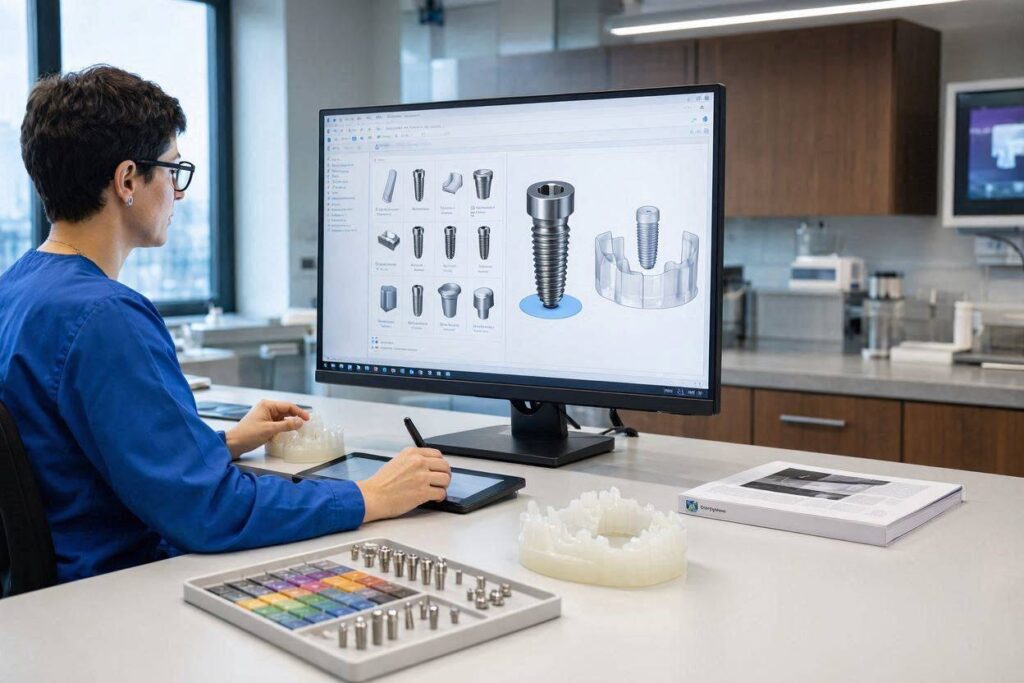
An implant library is a database of three-dimensional computer-aided design (CAD) files. Each file is a geometrically exact digital clone of a specific dental implant, abutment, scan body, and surgical kit component from a specific manufacturer. When you open implant planning software, the implant library is what allows you to select “Straumann Bone Level Tapered, 4.1mm x 10mm” from a drop-down menu and see it visually appear on your patient’s 3D X-ray. Without the correct library, your software is blind. It cannot model the emergence profile of the implant or the precise drilling sequence.
These libraries are created through a partnership between the implant manufacturers and the software companies. The manufacturer provides the exact engineering specifications, often the original CAD files used to mill the physical implant, and the software company encodes them into a proprietary format that their program can read. The result is a level of accuracy measured in microns. When you use a Dental Wings surgical guide sleeve, the library ensures that the physical sleeve in the guide perfectly aligns with the virtual implant you planned. This closed-loop digital accuracy is what makes modern guided surgery possible and safe.
The Unique Position of Dental Wings in Digital Dentistry
Dental Wings is a company with a rich history in the open architecture movement of digital dentistry. Unlike some closed-system manufacturers that force you to use only their scanners, their software, and their mills, Dental Wings was founded on the principle of interoperability. This means their scanners, particularly the laboratory scanners, are designed to export standard file formats (like STL) that can be read by a wide variety of CAD software. This open philosophy extends to their implant library management.
The DWOS (Dental Wings Operating System) software platform is the hub. It is a powerful CAD suite for designing copings, bridges, abutments, and implant bars. The implant libraries within DWOS are what enable the “implant” part of the workflow. A common point of confusion is that Dental Wings provides different software platforms, and the library format is not the same across all of them. The desktop laboratory software uses one library format, while coDiagnostiX, the leading implant planning software that was acquired by Dental Wings and is now a cornerstone of their guided surgery workflow, uses its own distinct, separate library format. A library file that works in DWOS will not work in coDiagnostiX and vice versa. You must know your target software before downloading.
The Implant Library Ecosystem for DWOS (The Lab Software)
For dental technicians and labs using the DWOS CAD software to design custom abutments or implant-borne crowns, the implant library is what converts a scan of a model with an implant analog into a workable digital model. The technician scans the physical model with a Dental Wings scanner, and the software uses the library to automatically align the digital implant body into the exact position of the analog. The technician then designs the restoration directly on top of this virtual implant.
The libraries for DWOS are in a specific file format, often with the extension .iwl or similar proprietary wrappers. Dental Wings originally maintained a dedicated online portal where registered users could log in and download these libraries directly. The management of these libraries has transitioned over time, and currently, the primary source for DWOS libraries is often through the company’s support portal or directly integrated into the software’s update mechanism. The key manufacturers like Straumann, Dentsply Sirona, Nobel Biocare, Zimmer Biomet, and BioHorizons are comprehensively represented, along with dozens of smaller, regional implant brands. The breadth of the DWOS library is a direct result of the open architecture philosophy; because the software does not discriminate, it must support everything.
The Critical Difference: coDiagnostiX Libraries for Guided Surgery
The second, and arguably more clinically critical, library ecosystem is the one for coDiagnostiX. This is the software used by surgeons and restorative dentists for implant planning on a CBCT scan and for designing surgical guides. The library here is even more complex. It does not just contain the implant body and the prosthetic abutment. It contains the full surgical kit: the drill sleeves, the drill bodies with their exact lengths and diameters, and the scan bodies used to digitize the patient’s mouth.
These coDiagnostiX libraries are the engine of guided surgery. When a dentist plans a case, they choose an implant from the library. The software then automatically pulls up the correct surgical guide sleeve geometry and the corresponding drill protocol. The output is an STL file of a surgical guide and a detailed drilling sequence report. These libraries must be absolutely perfect. A 0.1mm error in the library’s definition of a drill sleeve offset could cause the implant to be placed too shallow or too deep, ruining the case. Dental Wings validates these libraries rigorously before release. These libraries are downloaded via an integrated update function within the coDiagnostiX software. You open the program, click “Check for Library Updates,” and the software connects to the manufacturer’s server and downloads the new and updated files. It is a self-contained, validated loop.
“In my practice, the reliability of the coDiagnostiX library is my only safety net between the plan and the patient. I trust that if I plan a Straumann implant with a specific sleeve, the physical guide I get back from the lab will position the drill exactly where I planned it. That trust is built on the library being mathematically flawless. I never, ever use an unofficial or ‘hacked’ library.” — An Oral Surgeon Using Fully Guided Surgery
How to Find, Download, and Install Implant Libraries
The process of obtaining a library is not as simple as a Google search. Implant manufacturers protect their CAD data because an inaccurate library can lead to clinical failure, which is a liability for them. The correct, professional pathway is always through official channels.
For DWOS lab software users, the first step is to check the integrated DWOS Update Center, which is accessible from within the software’s help or settings menu. Many library packages are delivered as part of the regular software updates. If a specific, newly released implant system is not yet in the Update Center, the next step is to contact Dental Wings support directly through their official portal. They can provide a secure link to the specific library file.
For coDiagnostiX users, the process is streamlined. Open the software, navigate to the settings or library management section, and find the “Implant Libraries” or “Update” button. The software connects to the cloud-based Dental Wings server. You will see a list of all available manufacturer libraries, often organized by brand and by the date of the last update. You select the ones you need, click download, and the software imports and activates them automatically. This cloud-based model ensures that every user is on the most current, clinically validated version of a library. An outdated library might be missing a new implant diameter or abutment profile that a clinician wants to use, so this update process should be done weekly.
The Problem of “Custom” and “Third-Party” Libraries
A frequent request in the digital dentistry world is for a library for an implant that is not officially supported. Perhaps a clinician wants to use a small, overseas implant brand that has not partnered with Dental Wings. This creates a significant problem. The solution is sometimes to ask for a “generic” library or to reverse-engineer a scan body. This is highly dangerous and should be approached with extreme clinical caution.
An implant is more than just a cylinder. The connection geometry, the hex, the cone, and the internal threads are micron-level features. If a custom library is built by a third-party company without the manufacturer’s CAD data, it is an approximation, a best guess based on scanning a physical implant. This approximation can introduce a rotational misalignment error in the final crown or, worse, a positional error in the surgical guide. The liability for a clinical failure caused by an unofficial library will fall entirely on the user, not on Dental Wings and not on the implant manufacturer. The golden rule of digital implantology is simple: never use a library you do not trust with the patient’s health.
The Vital Clinical Link: Scan Bodies and Their Libraries
An implant library is clinically useless without its paired scan body library. A scan body is a small plastic or metal post that screws into the implant during the intraoral digital scan or during the scanning of a lab model. It tells the software the exact X, Y, Z position and rotation of the implant platform in three-dimensional space.
The scan body library is a precise CAD file of that scan body. The software uses a best-fit algorithm to match the point cloud data from the scan to the CAD model of the scan body in the library. Once this match is made, the software knows exactly where the implant platform is. It then swaps the virtual scan body for the virtual implant from the implant library. This “library swap” is the foundational magic of digital implant restorative dentistry. A common source of error is a mismatch between the physical scan body and the library file selected in the software. The scan body and the library file must be from the exact same manufacturer and must be the exact same version. Using a scan body from company A with a library file from company B will produce a crown that does not fit, because the computer has been fed a lie about where the implant is. This is a clinical error, not a software error.
Here is a summary of the different library types and their functions.
| Library Type | Software Platform | Primary User | Core Function |
|---|---|---|---|
| DWOS Implant Library | DWOS (Lab CAD) | Dental Technician | Design custom abutments and crowns on implant analogs |
| coDiagnostiX Implant Library | coDiagnostiX (Clinical) | Surgeon, Restorative Dentist | Plan implant placement on CBCT and create surgical guides |
| Scan Body Library | Intraoral Scanner / Lab CAD | Dentist, Technician | Transfer the precise 3D position of an implant from a scan |
| Model Analog Library | Model Builder Software | Lab, 3D Printer | Generate a precise pocket in a 3D-printed model for a physical analog |
Troubleshooting Missing and Mismatched Libraries
A “library not found” error is a common and frustrating hurdle. The most frequent cause is simple: the required library has not been downloaded and activated in your software. The second most common cause is a version mismatch. A clinician has bought a new scan body from an updated production run, but the lab is using an older version of the library, and the subtle geometric change between versions causes the alignment algorithm to fail.
The troubleshooting workflow for a library mismatch is methodical. First, verify the exact brand, implant line (e.g., Bone Level vs. Tissue Level), platform size (e.g., Regular CrossFit vs. Narrow CrossFit), and scan body part number. The part number is stamped on the physical scan body or its packaging. Second, in the software, verify that the selected library matches that part number exactly. The software name and the physical part number must be identical strings. Third, ensure both the clinic and the laboratory are using the same version of the implant library. This requires direct communication. If the lab is using DWOS and the clinic is using an intraoral scanner from a different manufacturer like 3Shape or iTero, the library exchange format is often the universal .stl or a specific .sdf file, but the libraries themselves must be from the same validated source. When in doubt, the safest path is to have the lab, which controls the final CAD design, provide the correct scan body library file to the clinic directly for that specific case.
Important Note: Keep a detailed log of all implant library updates. A simple spreadsheet recording the date of the update, the software version, and the implant libraries added or updated can serve as a crucial forensic tool if a case does not fit. This traceability is a marker of a professional, quality-controlled digital workflow.
The Future of Implant Libraries in an Open Digital World
The management of implant libraries is slowly moving toward a universal, cloud-based standard. The Open Implants Library (OIL) initiative and the standardization efforts around the Universal Library Format (ULF) are attempts to end the “format wars.” The vision is that an implant manufacturer publishes its CAD data once to a secure cloud repository, and every software platform—coDiagnostiX, DWOS, 3Shape, exocad, Blue Sky Bio—can read that single, manufacturer-signed file directly. This would eliminate the need for manual downloading and version syncing, and it would place the legal and quality assurance burden squarely on the manufacturer, where it belongs.
For Dental Wings users, this future will manifest as an even more seamless update process, potentially moving from a user-initiated download to a fully automated, always-online library sync. The commitment to open architecture that built the company positions it well for this future. The goal remains unchanged: when a surgeon picks up a physical implant, the digital world is already a perfect, micron-accurate mirror of it.
Conclusion
Dental Wings implant libraries are the digital CAD files that allow DWOS and coDiagnostiX software to accurately represent a physical implant, abutment, or scan body in a three-dimensional planning or design environment. These libraries are strictly platform-specific, with DWOS using one format for lab design and coDiagnostiX using a separate, surgically validated format for guided surgery. The integrity of every implant case depends on using the correct, manufacturer-verified library, downloaded directly from the official Dental Wings update portal, and on ensuring the clinic and lab are perfectly synced on the scan body library version. Using an unofficial or mismatched library corrupts the digital model and can lead to a clinical failure that is entirely preventable.
Frequently Asked Questions (FAQ)
Q: Can I use a Straumann library from coDiagnostiX in my DWOS software?
A: No. The libraries use different internal file formats and are not interchangeable. You must download the specific DWOS version of the Straumann library for the lab software and the coDiagnostiX version for the planning software.
Q: What do I do if my implant brand is not in the Dental Wings library list?
A: First, contact the implant manufacturer and ask if they have a partnership with Dental Wings. If they do, it will be available in the update portal. If they do not, you must ask the manufacturer to provide a generic STL library and understand that it has not been clinically validated by Dental Wings, and its use is at your own risk.
Q: How often should I update my implant libraries?
A: You should check for updates at least once a month. Implant companies frequently release new products and occasionally make minor engineering revisions to existing ones. Running an update before starting any new case is a best practice.
Q: Is the scan body library more important than the implant library?
A: They are equally important and mathematically linked. An error in either library will result in a poorly fitting restoration. Always verify that the scan body part number on your physical device matches the name of the library file you select in the software.
Additional Resource:
For official support and library downloads for coDiagnostiX and DWOS, visit the official Dental Wings software support portal: Dental Wings Software Support.