Dental Implant Color Chart: Your Complete Guide to Natural-Looking Smiles
When you think about dental implants, you probably picture the metal post or the crown on top. But there is a hidden art to making that implant disappear completely.
The secret is color.
Matching a dental implant to your existing teeth is not just about picking a white shade. It involves understanding gums, metals, ceramics, and even light.
That is where the Dental Implant Color Chart comes into play.
This guide walks you through everything you need to know. You will learn how professionals use color charts, why they matter, and how they help create a smile that looks 100% natural.
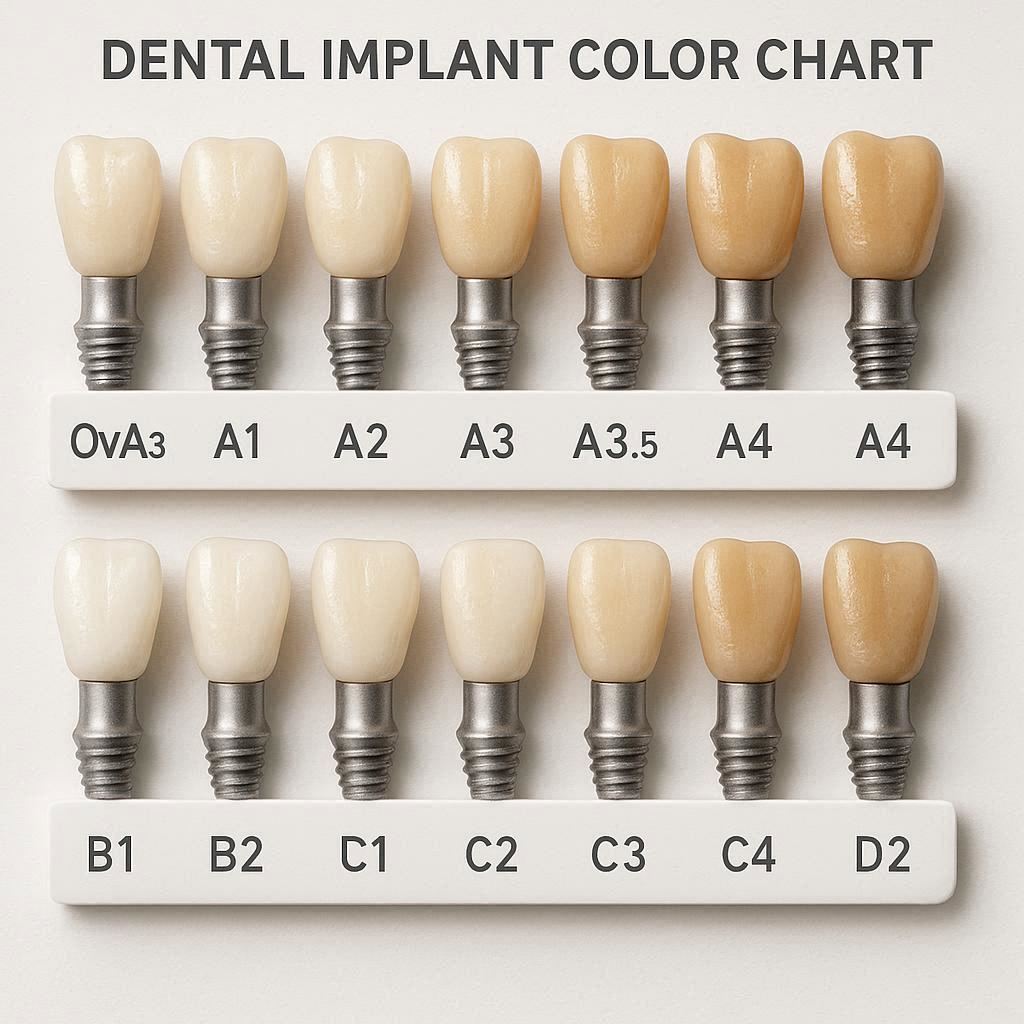
What Is a Dental Implant Color Chart?
A Dental Implant Color Chart is a visual reference tool. Dentists and lab technicians use it to select the right shades for different parts of an implant.
An implant has multiple layers. Each layer has its own color needs.
- The implant post (usually titanium or zirconia) sits inside the bone. You never see it. But its color can affect gum appearance if the gum is thin.
- The abutment connects the post to the crown. It can be metal or tooth-colored.
- The crown is the visible part. Its color must match your natural teeth.
- The gum tissue around the implant also matters. Pink ceramics or composite can replace missing gum.
A good color chart covers all these areas.
“Color matching in implant dentistry is both science and art. A proper shade guide is essential to avoid gray halos or unnatural looking gums.” — Dr. Elena Martinez, Prosthodontist
Why Tooth Color Alone Is Not Enough
Many people assume that matching a dental implant is just like matching a filling. But implants are different.
First, natural teeth are not a single color. They have gradients. The neck (near the gum) is darker or more yellow. The middle is brighter. The edge is translucent.
Second, gums have color too. Healthy gums range from pale pink to coral. Thin gums can look slightly blue if a metal implant shines through.
Third, light behaves differently in ceramics versus natural enamel. A good color match must work in daylight, office light, and candlelight.
This is why simple white shade guides often fail.
A proper Dental Implant Color Chart includes:
- Tooth shades (from whitest to darkest)
- Gum shades (pinks, reds, peaches)
- Opacity levels (how much light passes through)
- Surface texture references (matte, shiny, or mixed)
The Main Color Systems Used in Implant Dentistry
Professionals do not guess colors. They use standardized systems. These systems allow dentists and labs to communicate clearly.
Here are the most common color systems you will encounter.
1. VITA Classical Shade Guide
The VITA Classical is the oldest and most widespread system. It groups teeth into four color families:
- A (reddish-brown)
- B (reddish-yellow)
- C (gray shades)
- D (reddish-gray)
Each family has several levels of darkness (1 = lightest, 4 = darkest).
For implants, VITA Classical works well for crowns. But it does not include gum shades.
2. VITA 3D-Master
The 3D-Master improves on the Classical version. It organizes colors by three parameters:
- Value (lightness to darkness)
- Chroma (color intensity)
- Hue (color type)
This system matches teeth more accurately, especially in the middle range.
Many implant specialists prefer the 3D-Master because it reduces guesswork.
3. Ivoclar Chromascop
Chromascop uses 20 shades organized into five groups:
- 100 (whites)
- 200 (yellowish)
- 300 (orange)
- 400 (brownish)
- 500 (grays)
It is simple and intuitive. Good for quick matches, but less precise for complex cases.
4. GC Gum Shade Guide
This guide focuses only on gums. It includes 19 shades of pink, red, and coral.
Dentists use the GC guide when creating pink ceramic for gum replacement. This is essential for patients who have lost gum tissue due to disease or injury.
5. Zirkonzahn Shade Guide
Designed for zirconia implants and abutments. Zirconia is white, not gray like titanium. The Zirkonzahn guide helps match white abutments to natural teeth and gums.
Comparison Table: Main Color Systems for Dental Implants
| System Name | Best For | Number of Shades | Includes Gum Shades | Difficulty Level |
|---|---|---|---|---|
| VITA Classical | Tooth crowns | 16 | No | Easy |
| VITA 3D-Master | Tooth crowns (precise) | 29 | No | Moderate |
| Ivoclar Chromascop | Quick tooth matching | 20 | No | Easy |
| GC Gum Shade Guide | Pink ceramics | 19 | Yes | Moderate |
| Zirkonzahn | Zirconia implants | Varies | No | Moderate |
Important note: No single chart covers every case. Many implant specialists use two or three different charts depending on the situation.
How Dentists Use a Dental Implant Color Chart Step by Step
You may wonder how a dentist actually uses these charts during a real procedure.
The process is careful and methodical. Here is a typical step-by-step workflow.
Step 1: Natural Light Assessment
The dentist starts in natural daylight or under calibrated office lights. Fluorescent lights distort colors.
They look at your existing teeth and gums. They note the overall lightness, warmth, and any special features like spots or translucency.
Step 2: Tooth Shade Selection
Using a tooth shade guide (like VITA 3D-Master), the dentist holds tabs next to your teeth. They compare the middle, neck, and edge of the tooth.
They do this for multiple teeth. Usually the canine, central incisor, and premolar.
The dentist records the shade code, for example: 2M2 (VITA 3D-Master code for a medium-light tooth).
Step 3: Gum Shade Selection
If you need gum-colored ceramic, the dentist uses a gum shade guide. They hold pink tabs next to your natural gums.
They note the shade and also the surface. Are your gums smooth, stippled (orange-peel texture), or mixed?
Step 4: Abutment Color Discussion
The abutment connects the crown to the post. It can be:
- Titanium (grayish metal)
- Gold-plated titanium (yellowish)
- Zirconia (white)
- PEEK (tooth-colored polymer)
If you have thin gums, a gray titanium abutment may show through. In that case, the dentist may recommend a white zirconia abutment.
The color chart helps here too. Some charts show how different abutments look under 1mm, 2mm, or 3mm of gum tissue.
Step 5: Photography and Communication
The dentist takes high-resolution photos with a color checker card. They send the photos and shade codes to the dental lab.
The lab technician then creates the crown and pink ceramic. They use the same color chart to verify the match before shipping the final implant.
Step 6: Try-In and Adjustments
Before permanently placing the crown, the dentist does a dry try-in. You look in a mirror. If the color is off, the dentist sends it back to the lab for adjustments.
Some color adjustments happen chairside. The dentist can add surface stains and re-glaze the crown.
Metal Abutments vs. White Abutments: A Color Comparison
This is one of the most practical decisions you will face.
Metal abutments (titanium) are strong and cheap. But they are gray.
White abutments (zirconia or PEEK) are more expensive but blend better.
Here is a quick comparison.
| Feature | Titanium Abutment | Zirconia Abutment |
|---|---|---|
| Color | Gray | White to tooth-colored |
| Strength | Very high | High |
| Cost | Lower | Higher |
| Visibility under thin gums | Yes (gray halo) | No |
| Long-term gum health | Excellent | Excellent |
| Use for single implant | Yes | Yes |
| Use for multiple implants | Yes | Preferred for front teeth |
Reader note: If your gum is thicker than 3mm, a titanium abutment may not show at all. Your dentist can measure gum thickness with a simple probe.
Pink Ceramics and Gum Color Matching
Sometimes an implant replaces not just a tooth but also the surrounding gum.
This happens in cases of:
- Severe gum disease
- Trauma (accident)
- Tumor removal
- Congenital missing teeth
When gum is missing, the dentist can use pink ceramic to fill the space. This ceramic sits next to the crown and looks like natural gum.
The GC Gum Shade Guide is the industry standard here. It includes shades like:
- G1 to G4 (light to dark pink)
- GM1 to GM4 (mauve-pink, for darker skin tones)
- GO1 to GO3 (orange-pink, for high translucency)
- GR1 to GR4 (reddish-pink)
The technician layers these colors like paint. One gum area may use three different pink shades to look natural.
Realistic expectation: Pink ceramic looks excellent, but it does not move like real gum. It is fixed and firm. Most patients are very happy with the appearance.
The Problem with “One Shade Fits All”
Some low-cost dental clinics or online providers offer “universal shade” implants. They claim one color works for everyone.
This is false.
Human teeth vary enormously. Just look around you. Some people have bright white teeth. Others have warmer, darker teeth. Gums range from pale pink to deep brown.
A universal shade looks fake. It stands out.
Worse, a metal abutment under thin gums can create a blue-gray shadow. That is impossible to hide with a white crown alone.
Always insist on individual color matching. A proper Dental Implant Color Chart is not optional. It is essential.
At-Home Color Matching: Can You Do It Yourself?
You might be tempted to match your own implant color using online charts or phone apps.
The short answer is: do not.
Here is why.
First, phone screens distort colors. Your “white” may look blue or yellow on another screen.
Second, lighting changes everything. A shade that matches in your bathroom may fail in sunlight.
Third, natural teeth have internal color. A photo only captures the surface.
What you can do at home:
- Take photos in natural light (no flash)
- Compare your teeth to a physical shade guide (available online for 20–50)
- Write down which shades look close
But leave the final decision to a professional. They have calibrated lights, experience, and the ability to see subtle differences your eye may miss.
Realistic Color Results: What to Expect
Let us be honest about what a Dental Implant Color Chart can and cannot do.
Good results (realistic):
- Crown matches neighboring teeth at conversation distance (1–2 feet)
- No gray line at the gum margin
- Pink ceramic fills gaps naturally
- Invisible to most people, including friends and family
Excellent results (possible with expert work):
- Crown matches under all lighting conditions
- Dentist cannot tell which tooth is the implant without an X-ray
- Gum tissue looks healthy and natural
Unrealistic expectations (do not believe):
- The implant will look exactly like your original tooth (no. It can look as good, but different materials behave differently.)
- Perfect match forever (teeth change color over time. Implants do not. You may need to whiten your natural teeth later.)
- No one will ever see a difference under a microscope (at 10x magnification, differences exist. But who looks that close?)
Remember: A great implant is 90% invisible. That is already a massive win. Most people will never notice.
How Color Charts Help Different Types of Implant Patients
Single Tooth Implant
This is the simplest case. The dentist matches one crown to two neighboring teeth. A standard tooth shade guide works well.
Multiple Adjacent Implants
When two or more implants sit side by side, the gums between them are fake (no natural gum tissue). Pink ceramic is almost always needed. The GC Gum Shade Guide becomes critical.
Full Arch Implants (All-on-4 or similar)
For a full arch, the entire set of teeth is new. The dentist does not need to match existing teeth. Instead, they choose a shade that looks natural for your age and skin tone.
Lighter shades look younger. Darker or yellower shades look more natural for older patients.
Implants in the Front (Aesthetic Zone)
The front teeth are the hardest to match. People look at your smile constantly. Thin gums are common here.
For front implants, most experts recommend:
- Zirconia abutment (no gray)
- Layered ceramic crown (not monolithic)
- Use of VITA 3D-Master for tooth shade
- Use of GC gum guide if pink ceramic is needed
The Cost of Good Color Matching
You may worry that detailed color matching adds cost. It does. But not as much as you might think.
| Service | Typical Extra Cost | Notes |
|---|---|---|
| Basic tooth shade match | $0–50 | Included in most implant crowns |
| Advanced shade mapping (3D-Master) | $50–150 | Worth it for front teeth |
| Gum shade matching and pink ceramic | $200–600 | Only if gum is missing |
| Zirconia abutment (instead of titanium) | $150–400 | Recommended for thin gums |
| Lab color adjustment after try-in | $0–100 | Some labs do free adjustments |
Total extra for excellent color: $200–1,000 above basic implant cost.
This is not cheap. But compare it to replacing a poorly matched implant later. That could cost $2,000–5,000.
Invest in good color from the start.
How to Talk to Your Dentist About Color Matching
Many patients feel shy about asking for better color matching. Do not be. This is your smile.
Here are specific questions you can ask.
- “Which shade guide do you use for tooth color?”
- “Do you use a separate guide for gum color?”
- “How will you check the match before final placement?”
- “What abutment material do you recommend for my gum thickness?”
- “Can I see a try-in before you cement the crown permanently?”
A good dentist will welcome these questions. They show you are engaged.
If a dentist says “we do not do that” or “it is not necessary,” consider a second opinion.
The Future of Dental Implant Color Matching
Technology is improving fast.
Digital shade taking is already here. Devices like the VITA Easyshade measure color digitally. They remove human error. But they are expensive, so not every dentist owns one.
AI color matching is emerging. Some lab software now predicts the best shade based on a photo. Early results are promising but not perfect.
Custom staining kits allow dentists to adjust crown color chairside. This reduces lab returns.
3D-printed pink ceramic is becoming available. It allows precise layering of gum colors.
For now, the traditional color chart remains the gold standard. It is reliable, cheap, and works in any clinic.
Common Mistakes in Implant Color Matching (And How to Avoid Them)
Even professionals make errors. Knowing these mistakes helps you spot problems early.
Mistake 1: Matching to a single tooth
- Problem: Teeth vary. Matching to one tooth can make the implant stand out from the rest.
- Fix: Match to the canine, central, and premolar. Then average the shades.
Mistake 2: Ignoring gum color for pink ceramic
- Problem: Pink ceramic that is too light or dark looks like bubblegum.
- Fix: Use a dedicated gum shade guide. Take photos next to the patient’s own gums.
Mistake 3: Using a metal abutment with thin gums
- Problem: Gray shadow at the gum line.
- Fix: Measure gum thickness. If under 2.5mm, use zirconia.
Mistake 4: Matching under wrong light
- Problem: Crown looks good in the clinic but gray at home.
- Fix: Check the match in at least two light sources: daylight and warm indoor light.
Mistake 5: Skipping the try-in
- Problem: Cementing a crown that is slightly off, then regretting it.
- Fix: Always do a dry try-in. Use a mirror. Ask for changes before cementing.
List: Essential Features of a Good Dental Implant Color Chart
If you are buying a shade guide for personal use or your dental office, look for these features.
- At least 20 tooth shades
- Separate pink/gum shades (at least 10)
- Includes translucency samples
- Made of ceramic or high-quality resin (not paper)
- Replaceable tabs (so worn tabs do not distort color)
- Compatible with major lab systems (VITA, Ivoclar, etc.)
- Comes with a storage case to prevent staining
- Has a matte finish (glossy tabs give false reflections)
Real Patient Story: How a Color Chart Changed My Smile
“I had an implant for my upper left lateral incisor. The first crown was too white. It looked like a chiclet next to my other teeth. I hated smiling.
*My new dentist used a VITA 3D-Master guide. She spent 20 minutes just holding tabs next to my teeth. Then she sent photos to the lab with notes like “more yellow at the neck” and “slight translucency at the edge.”*
The second crown was perfect. My own mother cannot tell which tooth is the implant.
Cost me $300 extra. Worth every penny.”
— James T., Austin, TX
Frequently Asked Questions (FAQ)
1. Can I whiten my natural teeth after getting an implant?
Yes, but the implant crown will not whiten. It is made of ceramic or zirconia. If you whiten your natural teeth, the implant may become darker by comparison. Plan to whiten before final crown placement.
2. How long does a color-matched implant last?
The color itself is permanent. Ceramic does not fade or stain like natural teeth. However, your gums may recede over time, exposing the abutment. This is rare but possible after 10–15 years.
3. Do all dentists use a Dental Implant Color Chart?
No. Some general dentists rely on experience or basic guides. For best results, see a prosthodontist or an implant specialist. They are more likely to use advanced color systems.
4. Can I see the color chart before starting treatment?
Yes. Ask your dentist to show you their shade guides during the consultation. A transparent dentist will happily do this.
5. Is there a digital version of the color chart?
There are digital apps, but they are less accurate than physical tabs. Most professionals still use physical charts.
6. What if I have very dark gums?
The GC Gum Shade Guide includes shades for darker gums (G series up to G4, and GM series). Some labs can also custom-mix pink ceramic for your exact gum color.
7. How much does a personal shade guide cost?
A good VITA 3D-Master guide costs around 200–400.AGCGumGuideisabout150–250. For personal use, you can find basic guides for $20–50, but they are less accurate.
8. Do mini implants use the same color charts?
Yes. The same tooth and gum shade guides apply regardless of implant size.
Additional Resource
For a deeper dive into implant shade selection, including video tutorials and lab communication forms, visit the American Academy of Cosmetic Dentistry resource library:
👉 aacd.com/implant-shade-resources (external link, not affiliated)
Conclusion
A Dental Implant Color Chart is far more than a simple set of fake teeth tabs. It is a precision tool that guides dentists and technicians to create a natural, invisible smile. Matching tooth color alone is not enough. You must also consider gum shades, abutment materials, and light behavior. By understanding how these charts work and asking the right questions, you can ensure your implant blends seamlessly with your real teeth.
Disclaimer: This article is for informational purposes only and does not constitute medical advice. Dental implant procedures and color matching should always be performed or supervised by a licensed dental professional. Individual results vary. Always consult your dentist for personalized recommendations.