Dental Front Office: A Complete Guide to Design, Function, and Patient Experience
The dental front office is the first and last thing patients see. It is where they check in, ask questions, schedule appointments, and pay for treatment. It is also where your team manages schedules, insurance claims, and patient communication. A well-designed front office makes a practice run smoothly. A poorly designed one creates bottlenecks, frustration, and a bad first impression.
Many practice owners focus on clinical areas and overlook the front office. But the front office is the face of your practice. It sets the tone for the entire visit. It is where trust is built and where patients decide whether to return.
This guide covers everything you need to know about the dental front office. You will learn about layout, design, technology, staffing, and patient experience. By the end, you will have a clear plan to create a front office that works beautifully for patients and staff.
Why the Front Office Matters
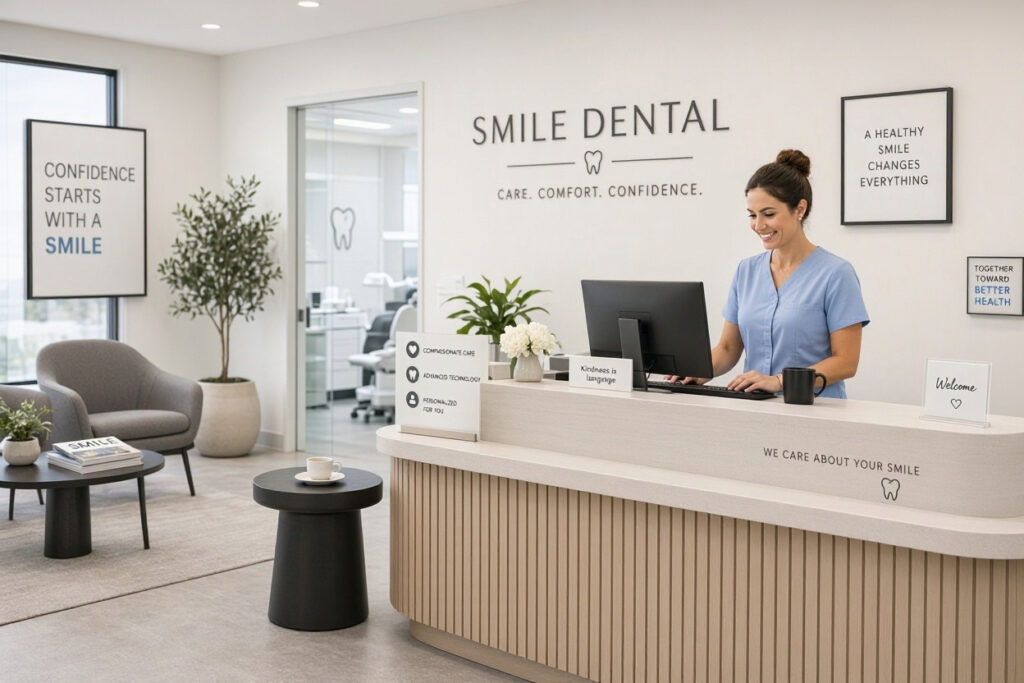
The front office is more than a reception desk. It is the operational hub of your practice. Here is why it deserves careful attention.
- It Creates the First Impression: Patients form an opinion within seconds. A clean, organized, welcoming front office builds trust immediately.
- It Sets the Tone: A calm, professional front office reduces patient anxiety. A chaotic one increases stress.
- It Drives Efficiency: A well-designed front office streamlines check-in, scheduling, and payment. This saves time for patients and staff.
- It Supports Communication: The front office is where patients ask questions and share concerns. A comfortable, private space encourages open communication.
- It Reflects Your Brand: The design, colors, and signage in your front office reinforce your practice identity.
- It Impacts Revenue: An efficient front office reduces no-shows, collects payments promptly, and maximizes schedule utilization.
“The front office is the cockpit of your practice. If it is disorganized, the whole practice feels disorganized. If it runs smoothly, everything else follows.” — Dr. Susan Blake, Dental Practice Consultant
Front Office Layout and Design
The layout of your front office affects workflow and patient experience. Here are the key considerations.
1. Reception Desk Placement
The reception desk should be visible immediately upon entering. It should be positioned so that staff can see patients arriving and patients can see staff. The desk should be at a comfortable height for standing and sitting.
2. Patient Check-In Area
Create a clear, designated area for patient check-in. This could be a section of the reception desk or a separate kiosk. Ensure there is space for patients to stand or sit while checking in.
3. Waiting Area Proximity
The waiting area should be adjacent to the reception desk. Patients should be able to see and hear when they are called. The waiting area should be comfortable and welcoming.
4. Staff Workspace
The front office staff need adequate space for computers, phones, filing, and paperwork. The workspace should be organized and free of clutter. Ensure ergonomic seating and good lighting.
5. Privacy
Patient conversations at the front desk should be private. Use partitions, background noise, or a separate consultation area for sensitive discussions. Avoid discussing patient information within earshot of the waiting room.
6. Accessibility
The front office should be accessible to all patients. Ensure counter heights accommodate wheelchair users. Provide clear signage and adequate space for mobility aids.
| Layout Element | Recommendation | Why |
|---|---|---|
| Reception Desk | Visible from entrance | Immediate greeting |
| Check-In Area | Clear and designated | Smooth patient flow |
| Waiting Area | Adjacent to desk | Easy calling of patients |
| Staff Workspace | Organized and ergonomic | Efficient workflow |
| Privacy | Partitions or separate area | Confidentiality |
| Accessibility | Wheelchair-friendly counters | Inclusive service |
Note for Readers: Walk through your front office as if you were a patient. Is it easy to find the check-in desk? Is the signage clear? Is the space welcoming? Ask for feedback from patients and staff.
Designing a Welcoming Reception Area
The reception area is where patients wait. It should be comfortable, calming, and welcoming.
1. Seating
Choose comfortable seating with good support. Avoid seating that is too low or too soft. Provide a mix of chairs and sofas. Ensure there is adequate space between seats for privacy and mobility.
2. Lighting
Use warm, soft lighting. Avoid harsh fluorescent lights. Natural light is ideal if available. Add table lamps or floor lamps for a cozy feel.
3. Colors
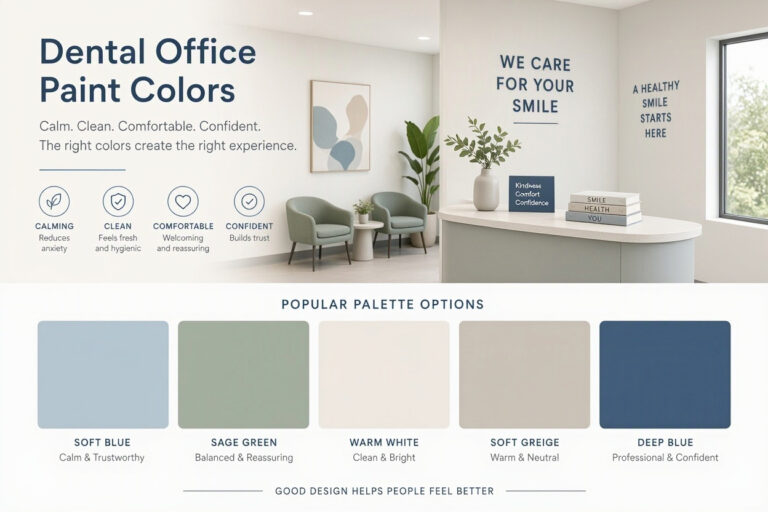
Choose calming colors like soft blue, sage green, or warm beige. These colors reduce anxiety and create a welcoming atmosphere. Use accent walls to add interest.
4. Decor
Add plants, artwork, and comfortable textiles. Keep decor minimal and uncluttered. Avoid dental-themed art that could increase anxiety. Choose calming nature scenes or abstract art.
5. Amenities
Provide amenities that make waiting more pleasant. This could include complimentary water, coffee, tea, magazines, and Wi-Fi. For pediatric patients, include a small play area with books and toys.
6. Signage
Use clear, easy-to-read signage. Display your practice name, logo, and hours. Include wayfinding signs for restrooms and treatment rooms. Consider a digital screen for announcements and educational content.
| Feature | Recommendation | Benefit |
|---|---|---|
| Seating | Comfortable, supportive | Patient comfort |
| Lighting | Warm, soft | Reduces anxiety |
| Colors | Calming neutrals | Welcoming atmosphere |
| Decor | Minimal, nature-inspired | Reduces stress |
| Amenities | Water, Wi-Fi, reading material | Improves experience |
| Signage | Clear, branded | Easy navigation |
Pro Tip: Create a “comfort station” with water, tissues, and hand sanitizer. This small touch shows patients you care about their comfort.
Technology in the Front Office
Technology streamlines front office operations and improves patient experience. Here are the key systems to consider.
1. Practice Management Software
This is the backbone of your front office. It manages scheduling, patient records, billing, and insurance claims. Choose software that is user-friendly, reliable, and integrates with other systems.
2. Online Scheduling
Allow patients to book appointments online. This reduces phone calls and gives patients flexibility. Ensure the system syncs with your practice management software.
3. Digital Check-In
Use tablets or kiosks for patient check-in. Patients can update their information, sign forms, and review treatment plans. This reduces paperwork and speeds up the process.
4. Patient Communication Systems
Use automated reminders for appointments via text, email, or phone. This reduces no-shows and keeps patients informed. Consider a system that allows two-way communication.
5. Payment Processing
Offer multiple payment options, including credit cards, debit cards, and digital wallets. Use a secure, integrated payment system. Provide clear pricing and payment plans.
6. Digital Displays
Use digital screens in the waiting area to display health tips, practice announcements, and educational content. This keeps patients engaged while they wait.
| Technology | Function | Benefit |
|---|---|---|
| Practice Management | Scheduling, records, billing | Streamlined operations |
| Online Scheduling | Patient self-booking | Convenience, fewer calls |
| Digital Check-In | Patient forms and updates | Faster check-in |
| Communication Systems | Reminders, updates | Reduced no-shows |
| Payment Processing | Multiple payment options | Faster payments |
| Digital Displays | Patient education | Engaged waiting |
Important Note: Ensure all technology complies with HIPAA and data protection regulations. Protect patient information with secure systems and regular backups.
Staffing the Front Office
Your front office team is the voice and face of your practice. They need the right skills, training, and support.
1. Key Roles
- Receptionist: Greets patients, manages check-in, answers phones.
- Scheduler: Manages appointments, reduces no-shows, optimizes the schedule.
- Insurance Coordinator: Verifies benefits, submits claims, handles denials.
- Billing Specialist: Processes payments, manages accounts receivable.
- Practice Manager: Oversees operations, staff, and patient satisfaction.
2. Essential Skills
- Communication: Clear, friendly, and professional.
- Organization: Manages multiple tasks and priorities.
- Problem-Solving: Handles patient concerns and scheduling conflicts.
- Technical Proficiency: Uses practice management software and other tools.
- Empathy: Understands patient anxiety and responds with care.
3. Training and Development
Invest in ongoing training for your front office team. This includes customer service, insurance processes, software updates, and communication skills. Happy, well-trained staff provide better patient experiences.
4. Staffing Levels
Ensure you have enough staff to handle patient flow. Understaffing leads to long wait times and frustrated patients. Overstaffing wastes resources. Monitor patient volume and adjust staffing accordingly.
| Role | Key Responsibilities | Skills Needed |
|---|---|---|
| Receptionist | Greeting, check-in, phones | Communication, organization |
| Scheduler | Appointments, reminders | Organization, problem-solving |
| Insurance Coordinator | Benefits, claims | Attention to detail |
| Billing Specialist | Payments, accounts | Numerical skills |
| Practice Manager | Operations, staff | Leadership, problem-solving |
Pro Tip: Cross-train your front office staff. This ensures coverage during absences and creates a more flexible, resilient team.
Patient Experience at the Front Office
The front office is where patient experience begins and ends. Here is how to make it exceptional.
1. Warm Greeting
Greet every patient with a smile and eye contact. Use their name. A warm greeting sets a positive tone for the visit.
2. Efficient Check-In
Make check-in fast and easy. Use digital forms and pre-registration. Avoid long waits and repetitive paperwork.
3. Clear Communication
Explain wait times, treatment plans, and payment options clearly. Use plain language. Answer questions patiently.
4. Comfort and Convenience
Offer water, Wi-Fi, and comfortable seating. Keep the waiting area clean and quiet. Provide updates if there is a delay.
5. Smooth Checkout
Make checkout efficient. Provide clear statements and payment options. Schedule the next appointment before the patient leaves.
6. Follow-Up
Send thank-you messages after visits. Follow up on unpaid balances and upcoming appointments. Show patients you value their continued trust.
“The front office is where patients decide if they trust you. Every interaction matters. A warm greeting, a smooth check-in, and a clear explanation can turn a nervous patient into a loyal one.” — Jennifer Walsh, Dental Marketing Consultant
Common Front Office Mistakes to Avoid
Even well-run front offices can have problems. Here are the most common mistakes and how to fix them.
- Cluttered Desk: A messy reception desk looks unprofessional. Fix it with regular organization and minimal decor.
- Long Wait Times: Patients hate waiting. Fix it by optimizing scheduling and staffing.
- Poor Phone Manners: The phone is often the first contact. Fix it with training and scripts.
- Lack of Privacy: Patients need confidential conversations. Fix it with partitions or a separate area.
- Outdated Technology: Old systems slow everything down. Fix it with regular upgrades.
- Unfriendly Staff: A rude receptionist drives patients away. Fix it with hiring and training.
- No Clear Signage: Patients get confused. Fix it with clear, branded signs.
“The most common mistake I see is treating the front office as an afterthought. It is the first and last impression. Invest in it like you invest in your clinical equipment.” — Dr. Mark Stevens, Dental Practice Growth Consultant
Budgeting for Front Office Improvements
Front office improvements can be affordable. Here is a simple budgeting framework.
| Item | Budget Range | Notes |
|---|---|---|
| Reception Desk | $1,000 – $5,000 | Custom or modular |
| Seating | $500 – $3,000 | Comfortable, durable |
| Lighting | $200 – $1,000 | Warm, soft fixtures |
| Decor | $200 – $1,000 | Plants, art, signage |
| Technology | $1,000 – $10,000+ | Software, hardware, kiosks |
| Signage | $100 – $1,000 | Branded, clear |
| Training | $500 – $2,000 | Customer service, software |
Pro Tip: Start with the highest-impact changes: a clean, organized desk, comfortable seating, and clear signage. These small changes make a big difference.
Frequently Asked Questions
What is the most important feature of a dental front office?
A warm, welcoming reception area with a clear check-in process. Patients should feel greeted and guided from the moment they arrive.
How can I make my front office more efficient?
Use digital check-in, online scheduling, and automated reminders. Organize the desk and train staff on efficient workflows. Monitor wait times and adjust staffing.
What technology should I have in my front office?
Practice management software, online scheduling, digital check-in, automated communication systems, and secure payment processing. Ensure all systems comply with HIPAA.
How do I improve patient privacy at the front desk?
Use partitions, background noise, or a separate consultation area for sensitive conversations. Train staff to speak quietly and avoid discussing patient information in public areas.
How many staff members do I need in the front office?
It depends on patient volume. A single dentist practice typically needs one to two front office staff. Larger practices need more. Monitor wait times and staff workload to determine optimal staffing.
What colors are best for a dental front office?
Calming colors like soft blue, sage green, and warm beige. These reduce anxiety and create a welcoming atmosphere. Add accent colors that reflect your brand.
Conclusion
The dental front office is the heart of your practice operations and the face of your brand. By focusing on thoughtful design, efficient technology, and warm patient service, you can create a front office that welcomes patients and supports your team.
Additional Resource
For more guidance on practice management and front office operations, explore the American Dental Association’s resources. https://www.ada.org/resources/practice/practice-management