Dental Office Instagram Feed: How to Build a Scroll-Stopping Grid That Attracts Patients
Your Instagram feed is your practice’s digital storefront. Before a new patient calls, they scroll through your grid. In seconds, they decide whether your office feels modern, friendly, and trustworthy. A messy feed with inconsistent photos and random posts sends the wrong message. A clean, purposeful feed builds confidence and turns browsers into booked appointments. This guide shows you how to plan, design, and maintain a dental office Instagram feed that works.
Why Your Feed Matters More Than Individual Posts
Individual posts come and go. Your feed is what people see first when they land on your profile. It is a visual summary of who you are.
A strong feed does three things. It builds trust, shows personality, and makes your practice memorable. A weak feed does the opposite. It creates doubt before a patient ever speaks to your team.
“Patients judge your practice by your grid before they judge it by your chairs. Your feed is the first appointment.” — Dental Social Media Strategist
Key Goals of a Great Dental Office Feed
- Instant credibility: Looks professional and active.
- Brand recognition: Consistent colors and style make you memorable.
- Emotional connection: Faces and stories build trust.
- Clear value: Patients understand what you offer and why you are different.
Understanding the Grid
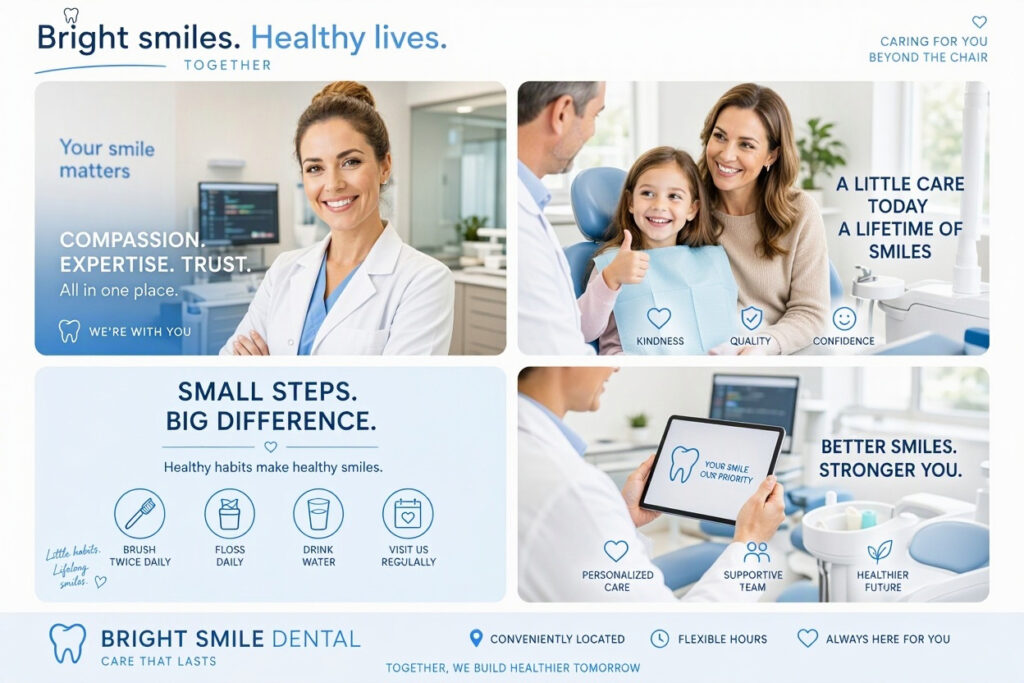
Instagram displays your posts in rows of three. The first nine to twelve posts are your “shop window.” They determine whether someone follows you or leaves.
The Top Nine Rule
Your most recent nine posts should look good together, not just individually. Before posting, preview how the image will appear next to your last eight posts.
Grid Layout Options
| Layout Style | Look | Best For | Effort |
|---|---|---|---|
| Checkerboard | Alternating colors or types | Organized, branded feeds | Medium |
| Row-by-row | Three related posts per row | Storytelling, campaigns | High |
| Tiled quotes | Text graphics mixed with photos | Education-focused feeds | Low |
| Photo-forward | Mostly real photos | Human, authentic practices | Low |
| Puzzle grid | Images split across posts | Launches, events | High |
Tip: Choose one layout and stick with it for at least a month. Switching styles too often makes the feed feel chaotic.
Building a Consistent Visual Style
Consistency is what separates a professional feed from a personal one. You do not need expensive equipment. You need a plan.
The Five Elements of a Consistent Feed
- Color palette: Two to three brand colors used in graphics, filters, and props.
- Fonts: One or two fonts for text graphics. Save them as presets.
- Photo style: Bright, clean lighting with similar editing across photos.
- Filters: One preset applied to every photo keeps tones matched.
- Logo placement: A small, consistent logo on graphics builds recognition.
Color Palette Examples by Practice Type
| Practice Type | Suggested Palette | Mood |
|---|---|---|
| Family dentistry | Soft blue, warm yellow, white | Friendly and welcoming |
| Cosmetic dentistry | Black, white, soft gold | Elegant and modern |
| Pediatric | Bright teal, coral, yellow | Playful and energetic |
| Holistic dentistry | Sage green, cream, warm brown | Natural and calm |
Important Note: Avoid heavy filters that change skin tones or make photos look unnatural. Patients want to see real faces and real spaces.
Content Mix for a Balanced Feed
A feed full of promotions feels like a billboard. A feed full of selfies feels unprofessional. Balance is the key.
The 4-3-2-1 Content Formula
- 4 educational posts: Tips, myths, and how-tos.
- 3 human posts: Team photos, patient stories, behind the scenes.
- 2 promotional posts: Services, offers, and announcements.
- 1 fun post: Humor, trends, or seasonal content.
Content Categories at a Glance
| Category | Purpose | Example |
|---|---|---|
| Education | Build authority | “How to floss correctly” |
| Team | Build trust | “Meet our hygienist Sarah” |
| Behind the scenes | Build connection | “Morning setup routine” |
| Patient stories | Build social proof | “Before and after whitening” |
| Promotions | Drive bookings | “New patient special this month” |
| Fun | Build personality | “Caption this dental meme” |
Tip: Plan your feed one week ahead. Use a scheduling tool to preview how posts will appear in the grid before publishing.
Photography Tips for a Polished Feed
You do not need a professional photographer for every post. A smartphone and good lighting go a long way.
Photo Guidelines
- Use natural light: Stand near a window, avoid direct sun.
- Keep backgrounds clean: A plain wall beats a cluttered counter.
- Shoot at eye level: Avoid shooting down at people.
- Take wide and close shots: Vary the composition for visual interest.
- Include real people: Faces get more engagement than objects.
- Avoid stock photos: They feel generic and reduce trust.
Comparison Table: Photo Sources
| Source | Cost | Authenticity | Best Use |
|---|---|---|---|
| Phone photos | Free | High | Everyday posts, team, behind the scenes |
| Professional shoot | $400 – $1,500 | High | Headshots, office tour, branding |
| Stock photos | $0 – $30 | Low | Rarely, for generic concepts only |
| Patient-submitted | Free | High | Testimonials, tagged photos |
Note: Always get written permission before posting patient photos. Never share images that reveal protected health information.
Writing Captions That Fit Your Feed
Captions support your visuals. They should match the tone of your grid.
Caption Structure
- Hook: A first line that stops the scroll.
- Value: A tip, story, or insight.
- Call to action: Tell them what to do next.
Sample Caption
“Your toothbrush is older than your phone case. 🪥 Most people keep brushes three times longer than they should. Swap it every three months for a healthier smile. Need a checkup? Tap the link in our bio to book.”
Caption Tips
- Keep it conversational, not clinical.
- Ask a question to spark comments.
- Include a clear call to action in every post.
- Use emojis sparingly and on-brand.
Hashtags and Discoverability
Hashtags help new patients find your feed. Use a mix of local and niche tags.
Hashtag Strategy
- Local tags: #YourCityDentist #YourNeighborhoodSmiles
- General dental tags: #DentalHealth #OralCare #HealthySmiles
- Service tags: #TeethWhitening #Invisalign #DentalImplants
- Community tags: #ShopLocal #SupportLocalBusiness
Tip: Save three hashtag sets in your notes app and rotate them. Use 10 to 15 tags per post.
Posting Frequency and Planning
Consistency beats intensity. A steady schedule builds an audience faster than sporadic bursts.
| Content Type | Frequency | Notes |
|---|---|---|
| Feed posts | 3 – 5 per week | Mix of categories |
| Stories | Daily | Engagement and quick updates |
| Reels | 2 – 3 per week | Reach and discovery |
| Lives | Monthly | Q&A and events |
Planning Workflow
- Monthly brainstorm: List 15 to 20 post ideas.
- Weekly batch: Take photos and design graphics in one session.
- Schedule ahead: Use Meta Business Suite or Later to queue posts.
- Review weekly: Check insights and adjust the plan.
Engagement That Grows Your Feed
A beautiful feed with no engagement is a missed opportunity. Instagram rewards accounts that interact.
Engagement Habits
- Reply to every comment within 24 hours.
- Like and comment on patient posts that tag you.
- Respond to DMs promptly.
- Follow and engage with local businesses.
- Ask questions in captions to encourage comments.
Important Note: Do not respond to medical questions in comments. Direct patients to call the office for personalized advice.
Measuring Feed Performance
Track your numbers monthly to see what resonates with your audience.
| Metric | What It Reveals |
|---|---|
| Reach | How many people saw your content |
| Engagement rate | How many liked, commented, or saved |
| Profile visits | Interest in your practice |
| Follower growth | Whether your audience is expanding |
| Saves | Content valuable enough to revisit |
| DMs and calls | Direct leads from Instagram |
Tip: Compare photos of team members to graphics. Most practices find people-focused posts outperform everything else.
Common Feed Mistakes to Avoid
- Inconsistent edits: Mixed filters make the grid look messy.
- All promos, no value: Followers tune out sales messages.
- Low-quality photos: Dark, blurry images hurt credibility.
- Ignoring the grid preview: Posts clash with neighbors.
- Posting and ghosting: No engagement kills growth.
- Using stock photos constantly: Feels generic and inauthentic.
Frequently Asked Questions
How often should a dental office post on Instagram?
Three to five feed posts per week, plus daily Stories and two to three Reels, keeps your feed active without overwhelming your team.
What should a dental office Instagram feed look like?
A balanced mix of education, team photos, behind-the-scenes content, patient stories, and occasional promotions. Keep colors, fonts, and editing consistent.
Do I need a professional photographer for my feed?
Not for every post. Phone photos work well for daily content. Hire a professional for headshots and branding shoots.
How do I make my feed look consistent?
Choose a color palette, one filter preset, and two fonts. Plan posts in advance and preview the grid before publishing.
Can I post patient photos on Instagram?
Yes, with written permission. Always get consent and avoid sharing protected health information.
Additional Resource
For free grid preview tools and scheduling features, visit Later for visual planning and Instagram scheduling resources.
Conclusion
A strong dental office Instagram feed builds trust before a patient ever calls. Choose a consistent visual style, balance your content, and post on a steady schedule. Engage with your audience and track what performs. Your feed is your digital handshake, so make it count.